Fake App Scams: How Counterfeit and Beta-Testing Apps Steal Data and Money
 One icon in the grid is not what it claims to be.
Copycats, Fleeceware and Hijacked Apps
A fake app is software built to look like something you already trust, or something you badly want. AARP describes several flavours. Copycats imitate popular apps and may carry malicious code or spyware. Fleeceware does deliver a service, but charges steep recurring fees for something free or cheap elsewhere, and turns a free trial into a subscription that is hard to cancel. Some scammers even misuse genuine apps from reputable developers to steal data, identities or money.
Android tends to carry more risk, partly because copycats can appear while an official version of a popular app is still on its way. But no platform is immune, and official stores have missed scam apps before.
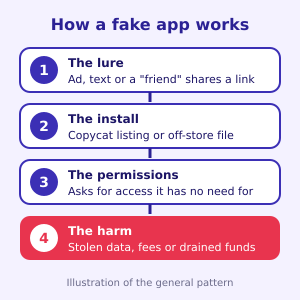 The usual path from a link to a loss.
How Scale Makes It Possible
A 2021 Washington Post analysis found that nearly 2% of the 1,000 highest-grossing apps in Apple's App Store were scams, costing consumers an estimated $48 million. Security firm Avast identified about 200 fleeceware apps in 2021 with over a billion downloads and more than $400 million in revenue, with some plans reaching $3,432 a year. Apple itself reported blocking more than $2 billion in potentially fraudulent transactions in 2022 and terminating 428,000 developer accounts for possible fraud. The sheer volume shows why a polished listing proves little.
The Beta-Testing Trick
The FBI's Internet Crime Complaint Center warned in August 2023 about criminals hiding malicious code in mobile beta-testing apps. Beta apps are pre-release versions that often skip the usual app store review, which makes them an attractive route. Contact often begins through phishing messages or romance scams on dating and networking apps; the "friend" then promises big payouts if you test an app. In one scheme, victims were told to deposit money into what looked like a cryptocurrency investment app, and the funds went straight to the criminals.
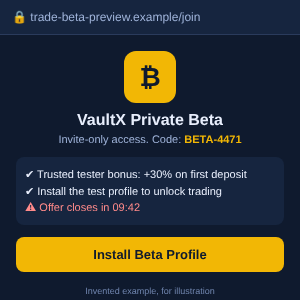 Invented example, for illustration: an invite code, a bonus and a countdown.
What a Convincing Listing Hides
Scam listings borrow names, logos and descriptions from real apps. AARP lists the tells: reviews that are suspiciously uniform, with many generic four- and five-star ratings; free apps that push in-app purchases or recurring charges without clear disclosure; and requests for location or contact access that the app has no need for.
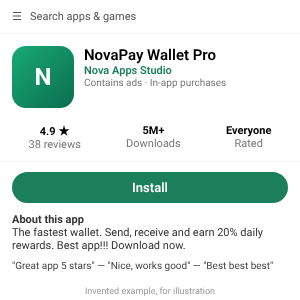 Invented example, for illustration: huge downloads, few reviews, vague text.
Signs Your Phone May Already Be Affected
The FBI lists rapid battery drain, slow performance, unauthorized installs, persistent pop-up ads, and apps with many downloads but few or no reviews. A separate FBI alert from March 2026 adds that apps can collect data across the whole device once permitted, that invite-friend features can expose the details of people in your contacts, and that the malware risk is higher with apps from unfamiliar websites or third-party stores.
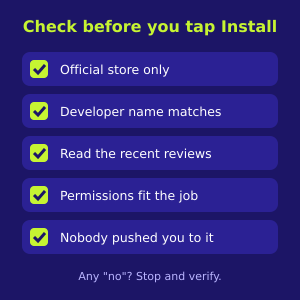 Five quick checks before installing.
Before You Tap Install
Download only from the Apple App Store or Google Play. Read the payment terms and trial deadlines, look at recent and negative reviews, check the download count and research the developer. Be sceptical of any app recommended by someone you met online or who contacted you by phone, text or email, and never send money to someone you have only met online. Limit permissions and update your software regularly.
- Check subscriptions: on iPhone, Settings, your name, Subscriptions; on Android, Play Store, profile picture, Payments & subscriptions.
- Look through bank statements, as some charges have continued after the app was deleted.
- Run up-to-date security software and review your privacy and security settings.
- Report the app to the store, and file a report at ic3.gov if you lost money or data.