Business Email Compromise Scams: When a Fake Boss or Supplier Email Redirects Your Payment
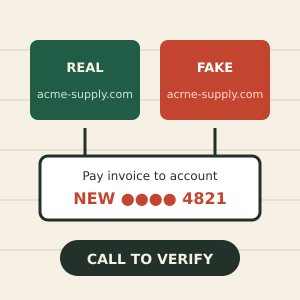 One swapped letter can redirect a whole invoice.
An Email That Looks Like Your Boss or Supplier
Business email compromise, often shortened to BEC, is a scam in which fraudsters impersonate executives or vendors to steal money or confidential data. AARP notes it is also known as CEO fraud, W-2 phishing or email account compromise. Criminals rely on spoofed emails and carefully researched spear-phishing, and sometimes malware, to get into email threads about finances. The FTC describes spoofing as creating an address that looks like it belongs to a company, then sending messages from it to steal passwords or bank details, or to trick someone into sending money.
The Numbers Behind the Losses
According to the FBI's 2024 Internet Crime Report, as cited by Nacha, BEC generated 21,442 complaints and about $2.8 billion in losses, second on the list by dollar value. Reported BEC losses from 2022 to 2024 came to nearly $8.5 billion. A 2025 survey by the Association for Financial Professionals found that 63% of organizations had experienced BEC in the prior year. That makes it a routine risk for any organisation that pays invoices by email.
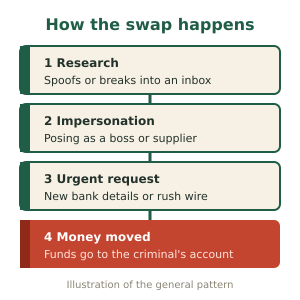 The usual sequence behind a BEC payment.
The Urgent Wire From the "CEO"
In CEO fraud, an employee with access to company accounts receives an urgent message that appears to come from a top executive, asking for a large wire transfer, often to a foreign account for a supposed acquisition or vendor payment. AARP's warning signs include a short, urgent message that pressures you to skip normal procedures, a sender who claims to be travelling, and an email that comes from a personal account such as Gmail instead of a company one.
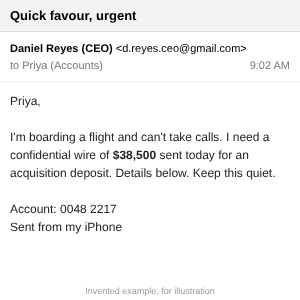 Invented example, for illustration: urgent, secret, and from a personal address.
The Supplier Whose Bank Details "Changed"
In vendor impersonation, a message that seems to come from a supplier asks you to update its payment details. Real estate deals are targeted the same way, with spoofed emails sent to agents, title companies or other parties to redirect payments. A related payroll or W-2 version has a fake executive ask for employee lists and tax forms, exposing Social Security numbers and enabling identity theft.
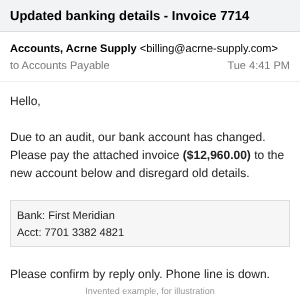 Invented example, for illustration: a look-alike domain and "reply only" confirmation.
Checks That Stop the Money
AARP advises verifying any request to send money or personnel records by phone or in person, and confirming changes to vendor bank details by calling a number you already know is legitimate, not one in the email. Check sender addresses for subtle misspellings or altered punctuation, and do not reply to suspicious emails or click their links. The FTC adds that businesses should use email authentication, keep systems updated and train staff to recognise phishing.
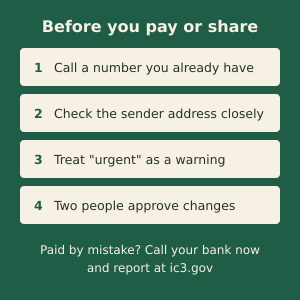 Four checks before any payment change.
- Contact your bank immediately, since it may be able to recall the funds.
- Save all emails and related evidence.
- Report it to the FBI at ic3.gov and to the FTC at ReportFraud.ftc.gov.
- Alert your staff and tighten approval rules for payment changes.