Bank Impersonation Scams: Why a "Fraud Department" Call Telling You to Move Money Is the Fraud
 A "safe account" is only safe for the person who opened it.
"We Spotted Fraud on Your Account"
The FTC describes the call: someone says they have found fraud or criminal activity on your bank, investment or retirement account and offers to "protect" your money by moving it out. They may ask for a verification code. The FTC says any of these requests means it is a scam, and that your money is fine where it is. A related story starts with a routine issue, such as suspicious activity on a shopping account, then escalates to claims that someone is using your identity and that a court will seize your savings unless you move them.
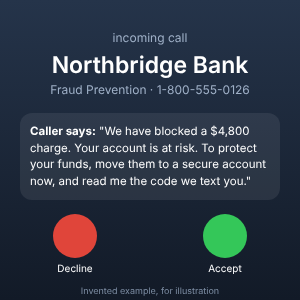 Invented example, for illustration: a trusted name on screen and a request to move money.
What the Caller Wants You to Do
According to the FTC, scammers may tell you to withdraw your savings and keep them in a box, to buy cryptocurrency or gold bars, or to use gift cards or a crypto ATM, sometimes while staying on the phone as you go to the bank. They may tell you to lie to anyone who asks why you are moving money, and say someone will collect the cash "for safekeeping". The FTC states plainly that it will never tell you to move your money to protect it.
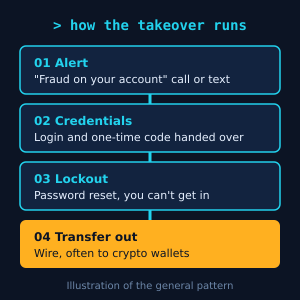 The pattern behind an account takeover.
Fake Login Pages and Stolen Codes
The FBI's alert of November 25, 2025 describes criminals posing as a bank's staff, customer or tech support, or a copy of its website, to gain access to online financial, payroll or health savings accounts. They use texts, calls, emails or fake sites to collect login details, including multi-factor codes and one-time passcodes, then reset the password and lock the victim out. Search engine ads that imitate real businesses can lead to convincing phishing sites. Stolen funds are wired to criminal-controlled accounts, often tied to cryptocurrency wallets, which makes recovery hard. In some cases, a second impostor posing as law enforcement pressures the victim for more account details.
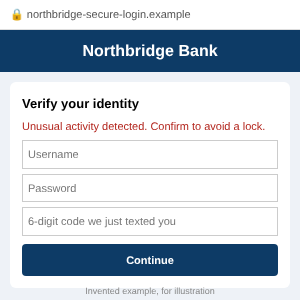 Invented example, for illustration: a look-alike page asking for the code just texted to you.
The Scale of the Problem
Since January 2025, the FBI's Internet Crime Complaint Center had received more than 5,100 account takeover complaints by the date of the alert, with losses exceeding $262 million. The FBI notes that multi-factor authentication will not protect you if you land on a fraudulent login page. The FTC warns that bank accounts have fewer protections than credit cards, so money moved in a scam is unlikely to be recovered.
Rules That Stop It
Never share a verification code, since it lets a scammer impersonate you, and genuine fraud staff never ask for one. Do not trust caller ID. Hang up and call the number on your card or statement. Reach your bank's site through a bookmark rather than search results or ads, use unique passwords with multi-factor authentication, and review accounts often for unauthorised transfers. Limiting personal details shared online also makes it harder for criminals to guess passwords or security answers.
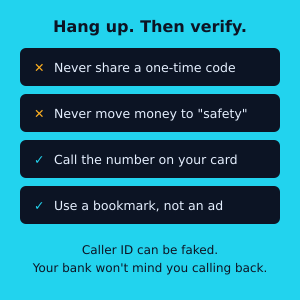 Two things never to do, two to do.
- Contact your bank immediately and ask for a recall or reversal of any wire, and a Hold Harmless Letter.
- Reset every exposed password, including other sites where you reused it.
- File a detailed complaint at ic3.gov, using the terms "Account Takeover" or "SEO poisoning", and report to ReportFraud.ftc.gov.
- If your identity was misused, report it at IdentityTheft.gov and tell the impersonated company so it can take down fake pages.
- FBI Internet Crime Complaint Center, Alert I-112525-PSA: Account takeover via impersonation of financial institutions (November 25, 2025)
- FTC Consumer Advice, Did someone tell you to move or transfer your money? It could be a scam (January 2024)
- FTC Consumer Advice, Got a call about fraud activity on your bank account? It could be a scammer (June 2024)